Make Teams Your Phone System, Not Just Your Meetings App

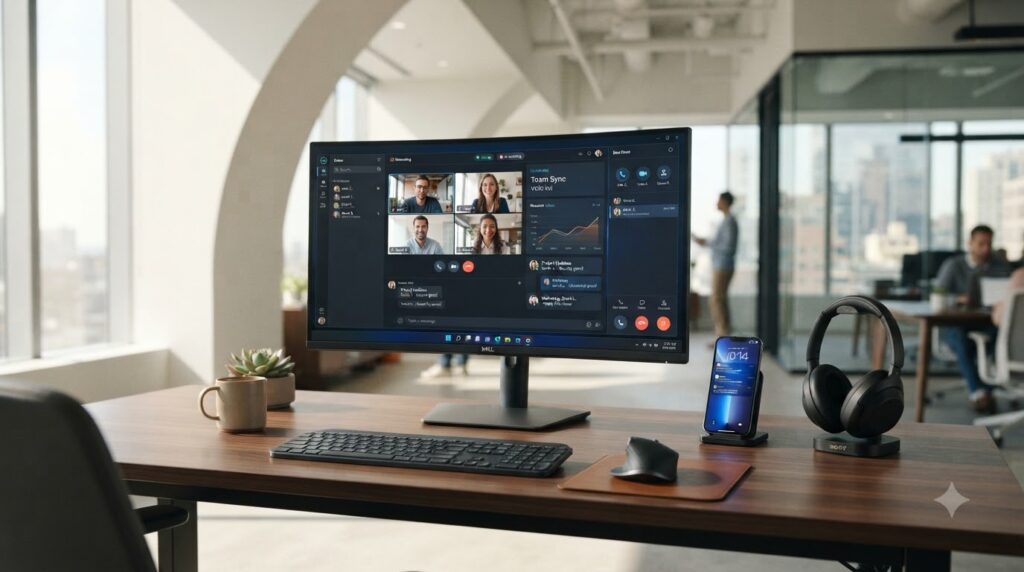
Your people already live in Microsoft Teams for chat and meetings. Teams Phone adds business calling to the same app, so one place handles calls, meetings, and messages, on any device, anywhere. Datacipher helps you plan and set up Teams Phone, including the connection to the outside phone network, so calling just works.

Business Challenges

Calls and Collaboration in Separate Places
When the phone system is one thing and Teams is another, people switch between tools and calling sits apart from where the rest of work happens.
Traditional phone systems and separate calling services carry cost and hardware that a modern, software-based approach can simplify.
Teams Phone needs a route to the public phone network, and choosing how, through Microsoft or your own carrier, is a real decision with cost and flexibility at stake.
Voice is unforgiving; people notice the moment a call drops or sounds poor, so call quality and reliability cannot be left to chance.
A modern workforce takes calls from the office, home, and the road, and the phone system needs to follow them across devices.

Our Solution

Datacipher helps you turn Microsoft Teams into your business phone system, so calling lives in the same app your people already use for meetings and chat. As a Microsoft partner, we plan the move from your current phone setup and set Teams Phone up so people can make and take business calls on their laptop or mobile, wherever they are working.

A key part of this is connecting Teams to the public phone network, and we help you choose the right route, whether that is Microsoft’s calling plans or connecting through your own carrier for more control and often better economics, then set it up properly. And because reliable calling depends on a sound underlying network, an area that is core to what we do, we make sure the foundation supports clear, dependable voice. The result is one simple, modern way to call, meet, and message, without a separate phone system to run.

Key Features

Business Calling in Teams

Full business phone capability inside Microsoft Teams, so calls, meetings, and messages all live in one app rather than separate tools.

Connection to the Public Phone Network

Help choosing and setting up the right route to the outside phone network, whether through Microsoft or your own carrier, balancing cost and control.

Migration From Your Current System

A planned move from your existing phone system to Teams Phone, so the switch happens smoothly rather than disruptively.

Calling on Any Device, Anywhere

Teams Phone set up so people can call from laptop or mobile, in the office, at home, or on the road, with one number that follows them.

A Network Built for Clear Voice

Making sure the underlying network supports reliable, high-quality calling, drawing on our core networking expertise.

Business Benefits

1

One App for Calls, Meetings, and Chat

Bringing calling into Teams means your people work in one place, rather than switching between a phone system and everything else.

2

A Simpler, More Modern Phone Setup

Moving to Teams Phone can remove the cost and hardware of a traditional phone system in favor of a software-based approach.

3

The Right Connectivity for Your Needs

Choosing the best route to the phone network means you balance cost and flexibility rather than defaulting to the first option.

4

Calling That People Can Rely On

Attention to the underlying network means calls are clear and dependable, so the phone system earns trust rather than frustration.

5

A Phone System That Follows Your People

Because calling works across devices and locations, your workforce stays reachable wherever they are working.

Solution Architecture

Teams Phone is set up as your business calling system within Microsoft Teams, connected to the public phone network by the route that best fits your needs, over a network designed to support clear, reliable voice.

OEM Partners

As a Microsoft partner, we deploy Teams Phone within Microsoft Teams and connect it to the public phone network through the route that suits you, drawing on our networking expertise to support reliable voice.

Image gallery marquee

Proven Customer
Outcomes

Delivering measurable business results through enterprise networking, cybersecurity, and cloud solutions that improve performance, resilience, and operational efficiency.
Case Study

From 20 Hours of Downtime to Under 1 Hour

DDoS attacks were knocking RailTel offline for nearly 20 hours a month. For one of India’s largest telecom providers, that couldn’t continue. Datacipher deployed Corero’s hybrid DDoS protection, phased in with zero disruption. Downtime fell to under an hour, and attacks now get blocked in real time.

Case Study

50% More Capacity, 70% Fewer Complaints

Rising user demand had pushed QTL’s network into constant congestion, dragging down service quality and pushing customer complaints higher every month. Datacipher upgraded the network with Juniper MX Series routers, rolled out in off-peak hours to avoid disruption. It helped lift overall capacity by 50%, and and cutting performance complaints by 70%.

Case Study

80% Fewer Wi-Fi Dropouts

Mahindra & Mahindra’s ageing Wi-Fi couldn’t keep up with a growing number of devices. Staff hit constant dropouts, and productivity slipped. Datacipher moved them to Juniper Mist, an AI-driven wireless network, phased in with minimal downtime. Connectivity issues fell 80%, and speeds rose 30%.

Case Study

A Data Center Move With Zero Downtime

With its lease expiring and its infrastructure past its prime, Technicolor had just six months to move its entire data center without disrupting a global media operation. Datacipher planned and ran the migration in carefully coordinated phases, hitting the deadline with zero unplanned downtime and moving Technicolor onto faster, more reliable infrastructure.

Case Study

60% Fewer Incidents, 35% Faster

BESCOM’s branch offices were running on outdated firewalls. They couldn’t handle modern threats or rising traffic, so security gaps and slowdowns crept in. Datacipher replaced them with Juniper SRX1500 firewalls, migrating every policy in phases. Security incidents fell 60%, and performance improved 35% across sites.

Case Study

20% More Revenue From New Services

Kerala Vision Broadband wanted to launch new, competitive services but was boxed in by its existing network. Datacipher upgraded the infrastructure with Juniper MX Series routers, adding support for advanced offerings like MPLS-based VPNs. The ISP piloted the services, rolled them out, and lifted revenue 20% in six months.

Why Datacipher

650+ Projects, Proven at Scale

A track record of enterprise engagements delivered across industries.

Calling Backed by Real Network Expertise

Reliable voice depends on the network, which is core to what we do, so we set up Teams Phone on a foundation built to keep calls clear.

The Right Connectivity Choice

Our value is helping you pick and set up the best route to the phone network, balancing cost and control rather than taking the default.

Support That Doesn't End at Go-Live

Once Teams Phone is live, we can keep it running well, backed by our operations centers.

FAQs

What is Teams Phone?
It adds business calling to Microsoft Teams, so the app your people already use for chat and meetings also handles phone calls. It can replace a traditional phone system, with calling available on laptop and mobile.
Through a connection to the public phone network, which can be provided by Microsoft’s calling plans or by connecting through your own carrier, an approach that often gives more control and better economics. We help you choose and set up the right route.
Yes. We plan the migration from your current setup to Teams Phone so the switch is smooth, and your people can keep their numbers and keep working through the change.
Reliable voice depends on the underlying network, which is core to our expertise. We make sure the network foundation supports clear, dependable calling rather than leaving quality to chance.
Teams Phone is Microsoft’s, and the connection to the phone network comes from Microsoft or a carrier. As a Microsoft partner, Datacipher plans it, sets it up, chooses the right connectivity with you, and makes sure the network supports it.

Latest from Datacipher

Ready to bring calling into Teams?